When time or budget runs short, one question decides success: What can we drop? MoSCoW settles that before things get tight.
- What for
- Define the scope and agree on priorities
- When
- At project start and before every major phase
- Who
- Client and project team together
- Result
- Requirements in four clear groups
What does MoSCoW mean?
The capital letters stand for four groups. The two lowercase o's are just there for pronunciation:
- Must have: Without this requirement, the project has failed. Think legal obligations or the core benefit.
- Should have: important, but there is a workaround. Ships if at all possible.
- Could have: nice to have. The first to go when things get tight.
- Won't have (this time): deliberately not in this project, maybe later.
The method comes from agile software development and is part of the DSDM framework. A common rule of thumb from DSDM: The Musts should take up at most about 60 percent of the effort. The rest is buffer.
Step by step
- Collect requirements. Everything the stakeholders wish for, without judging yet.
- Clarify the criteria. What makes something a Must? For example law, contract or core benefit.
- Sort. Every requirement goes into one group. Ask for each Must: Does the project fail without it?
- Check the effort. Do the Musts fit into time and budget, with a buffer?
- Record the Won'ts. Write down explicitly, and tell everyone, what is not coming this time.
- Re-sort when things change. When something new comes in, something else often has to go.
Example: website relaunch
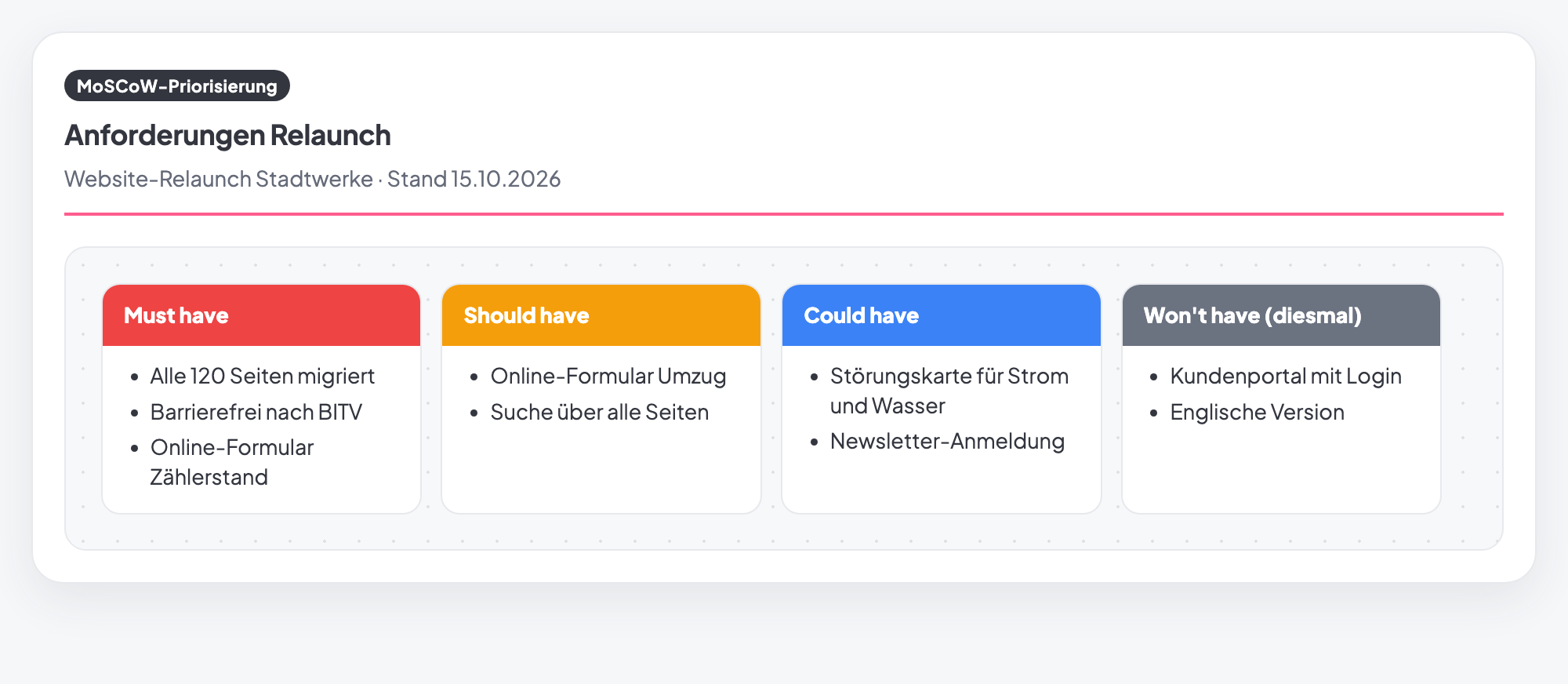
In the image above, the agency and the municipal utility sorted the wishes together:
- Must: all 120 pages migrated, accessible under the German BITV standard, and the online form for meter readings.
- Should: the form for moving house and a search across all pages.
- Could: an outage map for power and water, and the newsletter sign-up.
- Won't (this time): a customer portal with login and an English version.
The customer portal is a large project of its own. That is why it sits explicitly under Won't, so nobody quietly expects it.
Common mistakes
- Everything is a Must. Then there is no room to move when things get tight.
- Hiding the Won'ts. What is not said is expected.
- Should as a hidden Must. If you refuse to drop a Should, be honest and rank it as a Must.
- Sorted without the client. Priorities set by the team alone rarely hold.
- Sorted only once. New wishes need a new weighing.
MoSCoW method in Tasktopus AI
- Four columns on the project: Must have, Should have, Could have and Won't have (this time). Everyone in the project sees the current state.
- Print as a sheet: The "Sheet" view shows the four columns in color side by side, handy for aligning with the client.
- Quick to find: In the method picker it sits under "Prioritization & decision".
- Plan: included in all plans, including the free Starter.
Set up the MoSCoW method for free
Included in the free Starter plan. No credit card, no installation.
Start for freeFrequently asked questions
What do the letters in MoSCoW stand for?
Must have, Should have, Could have and Won't have. The two lowercase o's only make the word pronounceable.
What is the difference from the Eisenhower matrix?
MoSCoW decides which requirements belong in the project. The Eisenhower matrix sorts ongoing tasks by important and urgent.
How many requirements may be a Must?
As few as possible. A common rule of thumb from DSDM says: at most about 60 percent of the effort. The rest stays as a buffer.
Is the MoSCoW method free in Tasktopus AI?
Yes. It is one of the 12 core methods in the free Starter plan. Starter stays free for good, for up to 3 projects and 5 members.