Kanban comes from manufacturing at Toyota. In Japanese it roughly means "signal card". In a project, it helps you steer the flow of work.
- What for
- Make the flow of work visible and find bottlenecks
- When
- During the project, ideally a few minutes every day
- Who
- The whole team
- Result
- A board that shows the status of every task
What is a Kanban board?
A Kanban board has columns for the steps in your work, for example Backlog, In progress, Review and Done. Every task is a card and moves from left to right. Three ideas sit behind it:
- Make work visible: Everyone sees what is running and what is waiting.
- Limit work in progress: Each column has a cap, the WIP limit (work in progress). New work only starts once something is done.
- Improve the flow: If a column piles up, clear that jam first.
Step by step
- Define the columns. They mirror your real workflow. Four to six columns are usually enough.
- Create cards. One card stands for a manageable result, not a whole package.
- Set WIP limits. For example, at most three cards in progress and two in review.
- Define "done". When may a card move right? A shared definition of done helps.
- Check the board daily. Five minutes are enough: What is stuck, and who needs help?
- Clear bottlenecks. Better to finish one card together than to start a new one.
Example: website relaunch
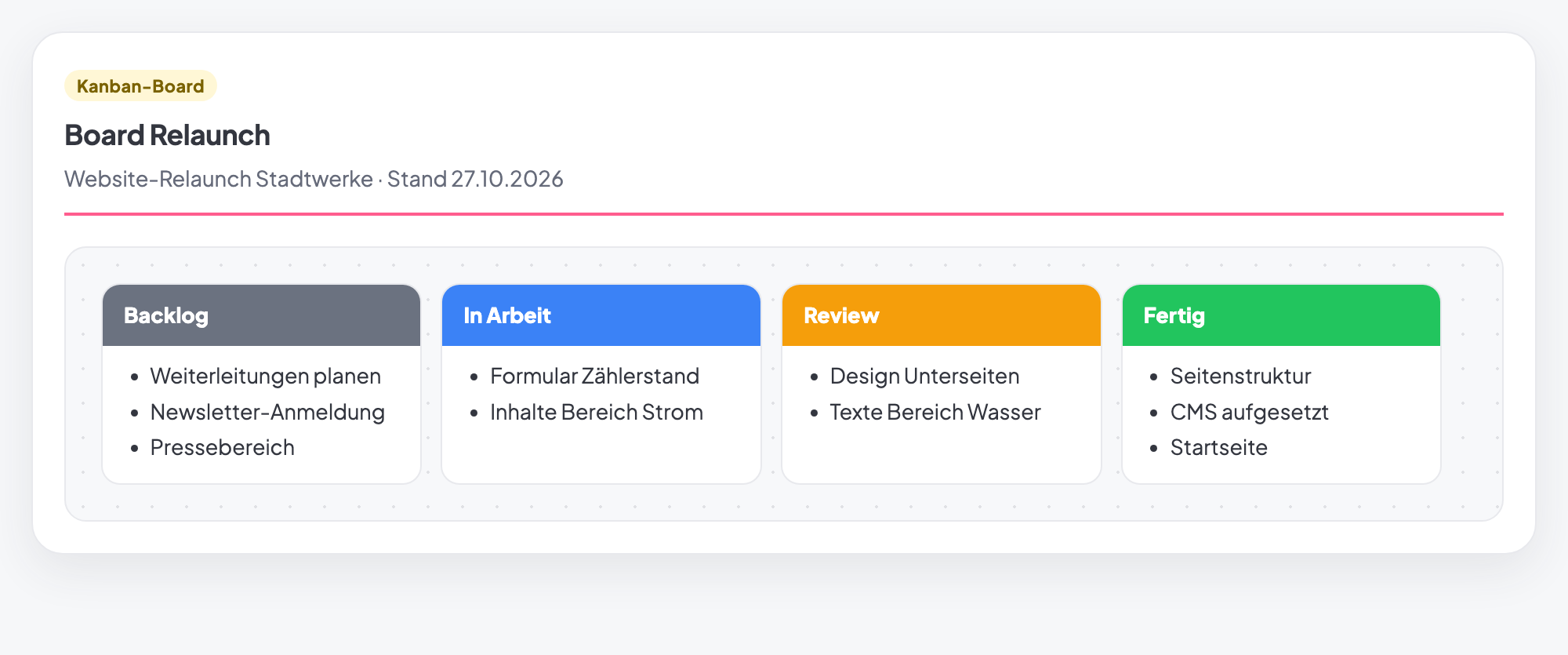
In the image above, two cards sit in Review: the design of the subpages and the copy for the Water section. Both are waiting for approval from the municipal utility.
Starting new topics from the backlog does not help here. The better move is to chase the approvals actively. Otherwise the jam in Review keeps growing.
Common mistakes
- Too many columns. The board turns into a form that nobody maintains.
- No WIP limits. Then a lot gets started and little gets finished.
- Cards too big. A card that sits in one column for weeks tells you nothing.
- Board out of date. An outdated board is worse than none.
- "Done" without criteria. Cards move back, and nobody knows why.
Kanban board in Tasktopus AI
- Tasks as a board: The task list can be shown as a board. The columns are the statuses: New, Planned, In progress, Blocked, In review, Approved and Done. You move cards by dragging.
- "Kanban board" method: There is also the method with the columns Backlog, In progress, Review and Done. It suits workshops, and the "Sheet" view can be printed.
- Good to know: Tasktopus AI does not enforce fixed WIP limits. Agree on them as a team and look at the board together.
- Plan: Board and method are included in all plans, including the free Starter.
Use the Kanban board for free
Included in the free Starter plan. No credit card, no installation.
Start for freeFrequently asked questions
What is the difference between Kanban and Scrum?
Scrum works in fixed sprints with fixed roles. Kanban has no sprints. Work flows continuously, limited by WIP limits.
What is a WIP limit?
WIP stands for work in progress. The limit sets how many cards may sit in one column at the same time.
Do I need the method if there is already a task board?
For daily work, the task board is enough. The method is handy for workshops or a printed status.
Is the Kanban board in Tasktopus AI free?
Yes. Board view and method are part of the free Starter plan. Starter stays free for good, for up to 3 projects and 5 members.