Every project has risks. It gets dangerous when they all look equally important. The risk matrix puts them in order, so time and attention go where they make the biggest difference.
- Purpose
- Rate risks and rank them
- When
- At project start and regularly after that, for example at every milestone
- Who
- The project lead with the team that knows the risks
- Result
- Rated risks with countermeasures and owners
What is a risk matrix?
A risk matrix has two axes: the probability that a risk occurs and its impact if it does. Each risk gets a level on both axes and lands in one cell. Three levels (low, medium, high) or five are common.
The cells are color-coded: green means watch, yellow means plan countermeasures, red means act now. If you like numbers, multiply the levels. With three levels, that gives values from 1 (low times low) to 9 (high times high).
Step by step
- Collect risks. What could go wrong? Phrase each risk as an event with a consequence: “Copy arrives late, so the go-live slips.”
- Define the levels. Agree up front what “high” means. For impact, for example: schedule or budget are seriously at risk.
- Rate the probability. How likely is the event before the project ends?
- Rate the impact. What happens to schedule, budget, and quality if it occurs?
- Define countermeasures. Red cells first. For each important risk, you decide: avoid, reduce, transfer, or consciously accept. Every countermeasure gets an owner.
- Reassess regularly. Risks move. A quick look at each milestone is often enough.
Example: website relaunch
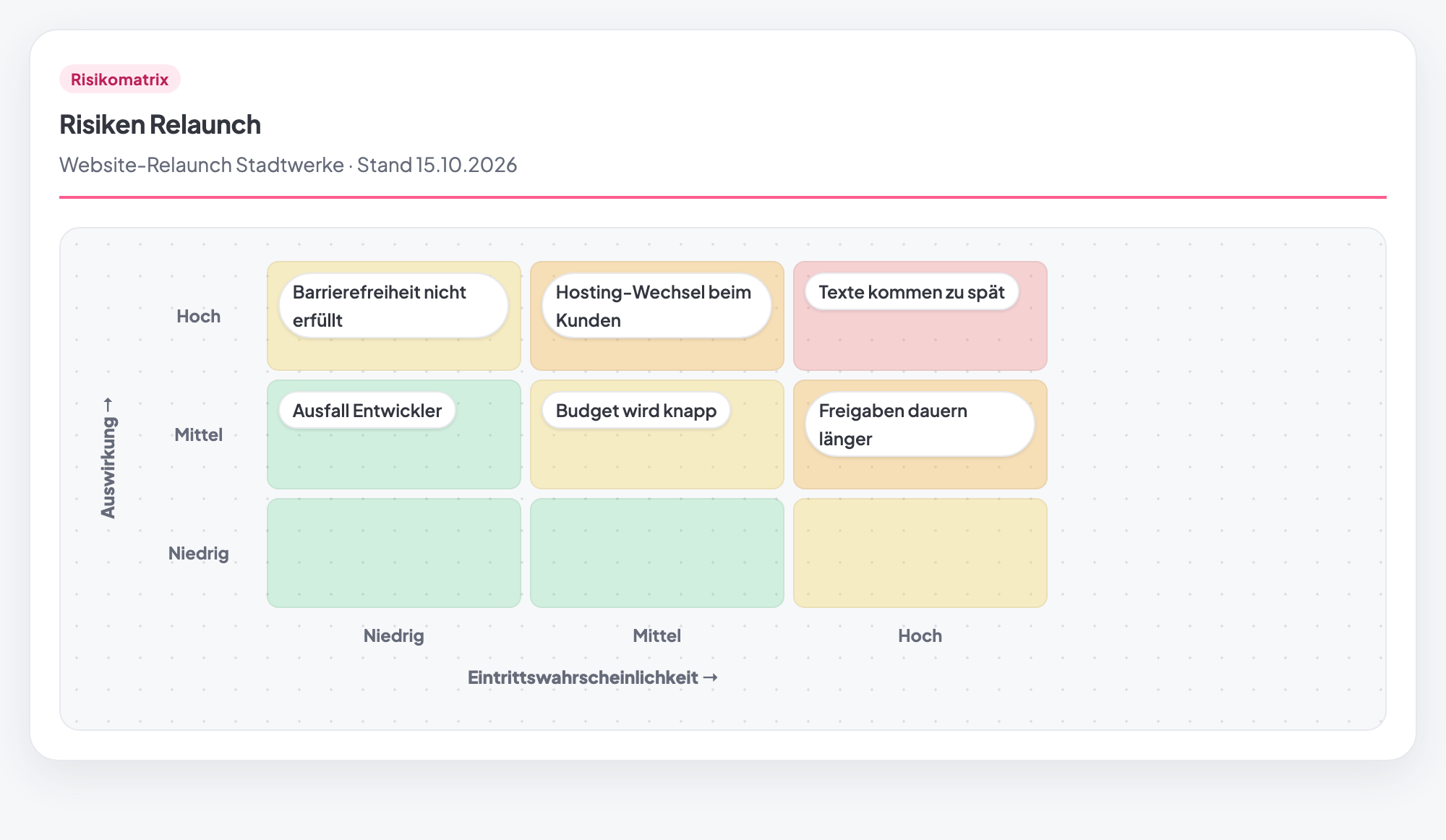
In the screenshot above, the team has placed six risks. Here is what follows:
- “Copy arrives late” (probability high, impact high) sits in the red cell. Countermeasure: make copy delivery a milestone with a deadline, and prepare placeholder text.
- “Approvals take longer” (high, medium): agree on fixed approval deadlines.
- “Client switches hosting” (medium, high): involve the client’s IT early.
- “Accessibility not met” (low, high): unlikely, but expensive. So test early instead of just before go-live.
- “Budget runs tight” and “Developer unavailable”: watch them, and arrange a backup.
Typical mistakes
- Vague risks. “Time problems” cannot be rated. “Approvals take longer than three days” can.
- Everything “medium.” If nobody commits, you get a matrix that says nothing.
- No countermeasures. A rated list without owners changes nothing.
- Only at the start. A risk matrix from the kickoff is outdated after three months.
- Issues instead of risks. What has already happened is no longer a risk. It is a task.
Risk matrix in Tasktopus AI
- As a table on the project: columns for risk, probability, and impact, each low, medium, or high. The “Sheet” view turns them into the color-coded 3×3 matrix.
- ✨ Tako pre-fills: Tasktopus AI adds risks from your project data. That includes overdue tasks and milestones, blockers, tasks without an owner, overload, and budget. Each suggestion comes with an estimate of probability and impact. This is rule-based, drawn from the project data, with no language model involved. Nothing is stored until you save.
- Transfer as a risk: select entries and move them into the project’s risk register. The level is probability times impact; high times high becomes “critical.” You can change it beforehand, and existing risks are skipped.
- Suggested in running projects: the method picker lists the risk matrix under “Fits the project now” as soon as the project is running.
- Plan: included in all plans, including the free Starter.
Create a risk matrix for free
Included in the free Starter plan. No credit card, no installation.
Start for freeFrequently asked questions
3×3 or 5×5: which risk matrix is better?
For most projects, 3×3 is enough. It is quick to explain and forces clear statements. A 5×5 matrix is more fine-grained, but it suggests a precision that estimates rarely have.
What is the difference between a risk matrix and a risk register?
The matrix rates risks and shows their ranking. The register is the running list with countermeasures, owners, and status. In Tasktopus AI, you transfer entries from the matrix straight into the project’s risk register.
What is the difference between a risk and an issue?
A risk might happen. An issue is already here. You assess risks and take precautions. You solve issues with tasks.
Is the risk matrix in Tasktopus AI free?
Yes, including “Tako pre-fills” and the transfer to the risk register. It is one of the 12 core methods in the free Starter plan.